What we do
Any public website, any scale
Give us a target site and requirements. We extract, clean, and deliver structured data on a schedule you define — no infrastructure needed on your side
We handle the hard parts
Anti-bot bypass, CAPTCHA solving, browser fingerprinting, JavaScript rendering, proxy rotation, and schema design — all managed by our team
Delivered to your pipeline
Real-time API, scheduled files, or webhooks. Data lands in S3, GCS, SFTP, or your destination of choice — on the cadence you need
Dedicated account manager
A named person on every project. They handle onboarding, monitor delivery, and respond to issues the same day
How it works
1
Tell us your requirements
Target sites, data fields, delivery format, and refresh frequency. A 20-minute call is usually enough to scope.
2
We build and test
Our team builds the extractors, validates against your schema, and delivers a sample for your approval before going live.
3
Data arrives on schedule
Continuous delivery with monitoring. Your dedicated account manager handles any site changes or issues.
B2B & Sales
AI SDR Platforms
People and company data for automated prospecting, personalisation, and AI-driven outreach sequences
Sales Intelligence
LinkedIn profiles and company data as a full enrichment layer for account intelligence and CRM tools
AI Recruiting Platforms
Candidate profile data for sourcing engines, skills-based matching, and AI-powered recruiting tools
AI & Model Training
Training data, RAG pipelines, and agent enrichment. Schema-consistent records ready for ingestion
Creator & Influencer
Influencer Marketing Platforms
Creator discovery, audience analytics, and campaign management tools built on YouTube, TikTok, and Instagram data
Creator Discovery Tools
Search and filter 200M+ YouTube channels and 100M+ TikTok profiles by niche, follower tier, engagement, and location
Creator Intelligence
Engagement benchmarks, subscriber growth trends, SEO scores, and contact emails across all major platforms
Travel Intelligence
Rate Parity Monitoring
Track hotel and airline pricing across OTA and direct channels. Detect parity breaches in real time
Competitive Rate Intelligence
Monitor competitor pricing across target routes and properties. Feed directly into revenue management systems
OTA Aggregation
Normalised pricing and availability data across 19+ OTAs and brand sites. One schema, all sources
Reviews Intelligence
Competitive Intelligence
Monitor competitor ratings, review trends, and sentiment shifts across G2, Glassdoor, and Capterra
Voice of Customer
Structured review data for NLP, sentiment modelling, and product intelligence at scale
Employer Intelligence
Track employer sentiment, interview experience, and culture signals across Glassdoor and Clutch
WebAutomation
Pricing
Get started free

How to use the WebAutomation.io Amazon AWS S3 Integration

Our new webautomation.io Amazon AWS S3 integration now allows you to file transfer your webautomation.io scraped data into your S3 bucket automatically

What is AWS S3

Amazon S3 or Amazon Simple Storage Service is a service offered by Amazon Web Services that provides object storage through a web service interface. It is most popular because you can use Amazon S3 to store and retrieve any amount of data at any time, from anywhere.

Please follow step by step guide below to learn how to use this integration

Pre-requisites

  • An AWS account, signed into
  • A webautomation.io account with at least 1 extractor set up


Step 1: Create an AWS S3 Bucket

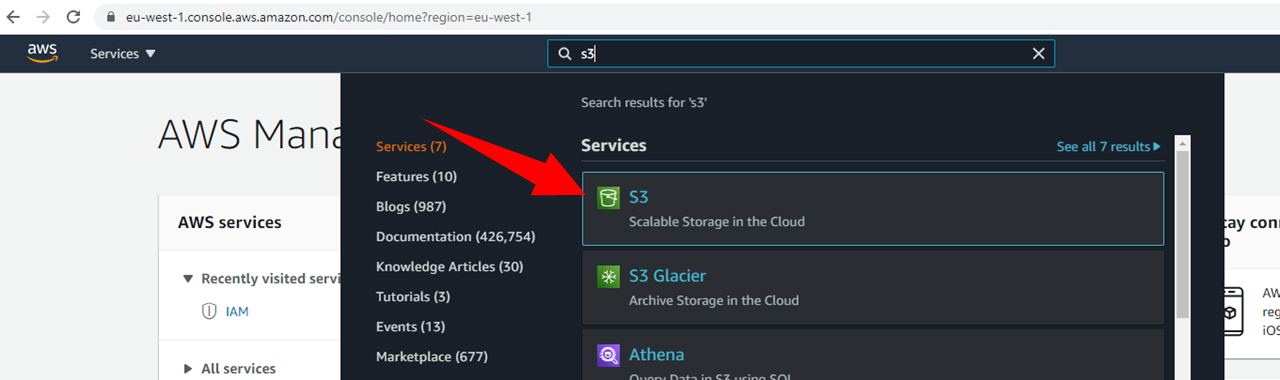
  • Search for S3, from list of services
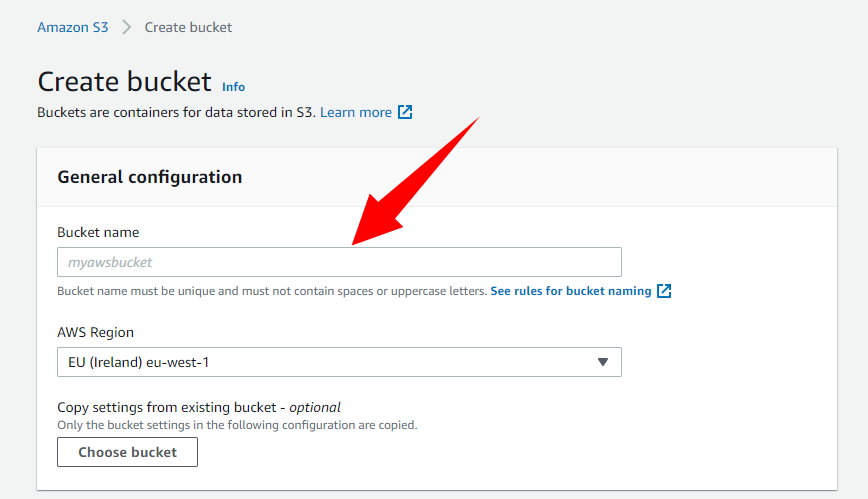


  • Click on create bucket


  • Name your bucket


Step2: Create AWS IAM Access


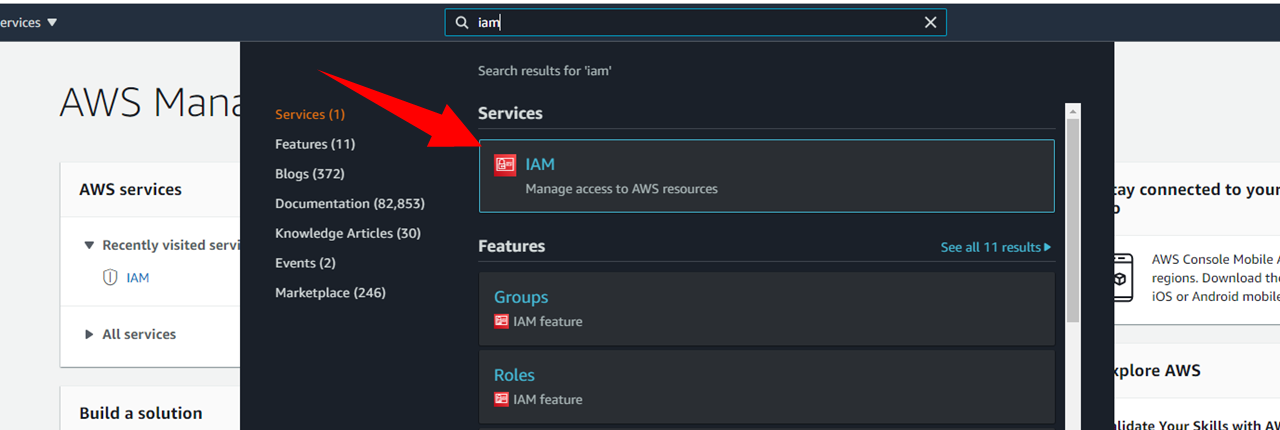
  • Search for IAM from list of services


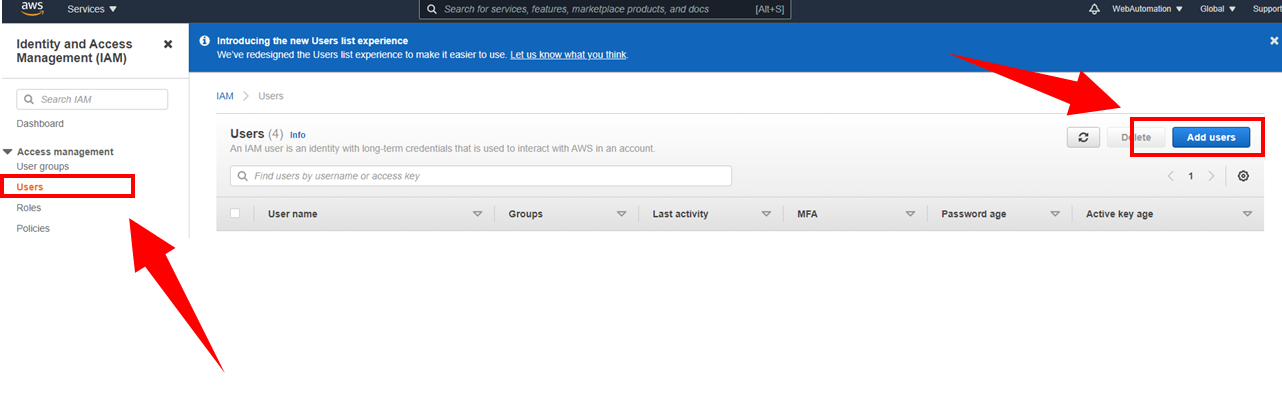
  • Click on Users , then "add users


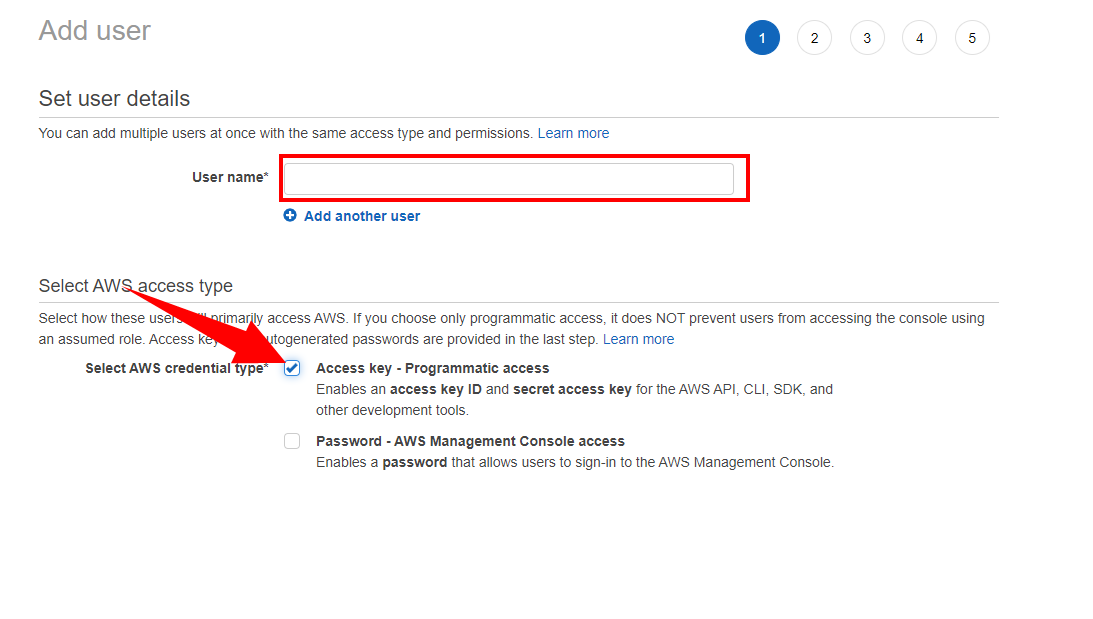
  • Select programmatic access
  • Set permissions boundary ( recommended to only allow access to S3)
  • Once the user is created you will be presented the Access key ID and Secret key. You can download for full details.. Copy these are you will need to enter into webautomation.io
  •  

Step 3: Link to your webautomation.io account/extractor 


  • Click on the Amazon S3 integration option from your webautomation.io in-app https://webautomation.io/service/s3/list/
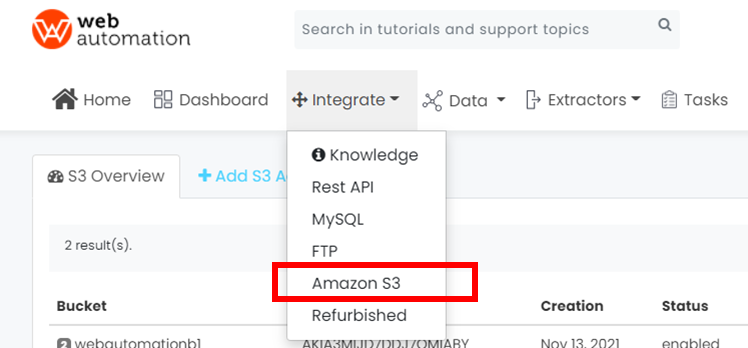
 

  • Select the extractor which you would like to link to the S3 account and then enter the mandatory S3 details
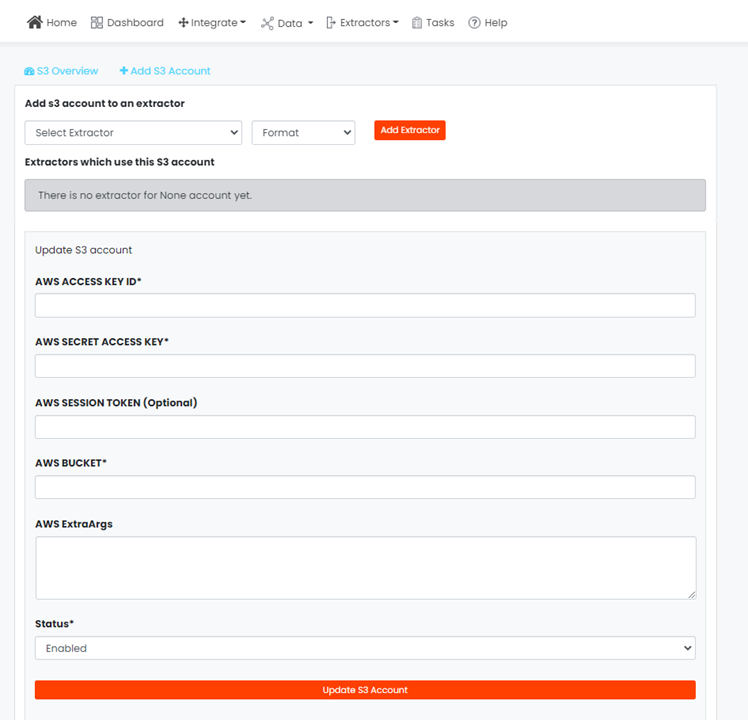
 

  • Once entered click the update S3 account. Next time you run this extractor the data will be automatically transfered over

Step 4: Run it

Run the extractor linked to the S3 account and once the session is completed the data will be transfered over to your S3 bucket

Are you ready to start getting your data?

Your data is waiting….

Leave a comment:

You should login to leave comments.