

By Admin @February, 4 2022

Job scraping is an upcoming trend in the market. It refers to the collection of job postings available in the market and sorting them into relevant categories according to your needs.
Job scraping can benefit many companies and industries. There are numerous jobs available in the market, and these openings are ever-changing as employees are hired. Finding relevant data, which is up to date is an extremely difficult task. Hence, it’s much easier to collect that data yourself by scraping it.
Indeed is one of the biggest job boards and it’s the perfect place to start. Scraping it can give you a headstart in finding the right leads and save time and money
Consistency is the key to any successful service. By keeping yourself up to the date with the trends in the job market, you can keep an eye out for potential candidates, their expected salary, location preferences, company preferences etc.
What kind of data can you get from scraping Indeed.com?
Job postings
Company profiles
Job descriptions
Job locations
In this guide, we are going to explain step by step how to use the webautomation.io automated Indeed scraper to extract the data from the Indeed. With the help of webautomation, you will be able to find vacancies, applicant profiles, company details and location etc.
For this user guide, we are going to use Webautomation.io Wizard mode
If you don’t have an account on webautomation, please use the signup link for a free trial. New users can use the email address to create an account.
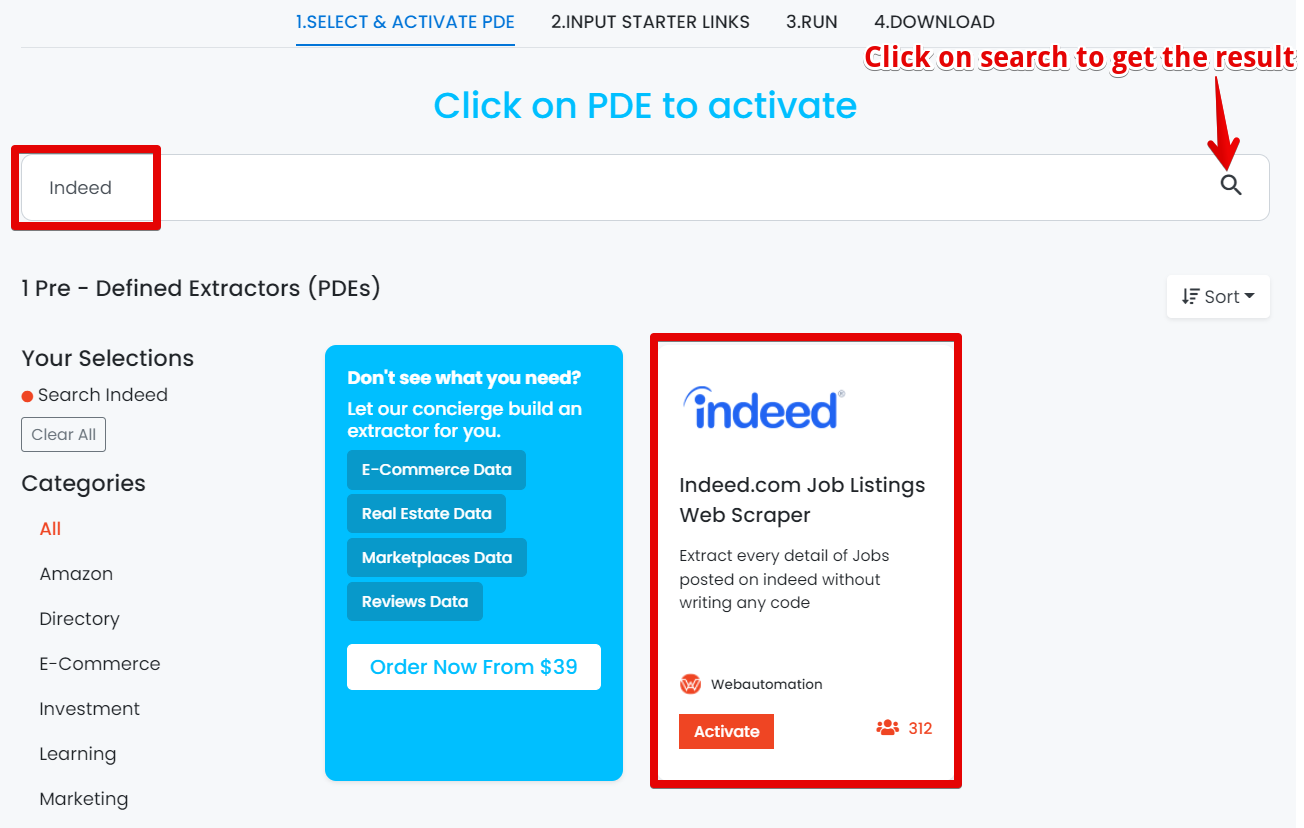
When you log in, you will be redirected to the ‘Get started wizard’. Go to the search bar and enter ‘Indeed’ and then click on the search icon on the right side as shown below. After getting the search result click on it to activate.
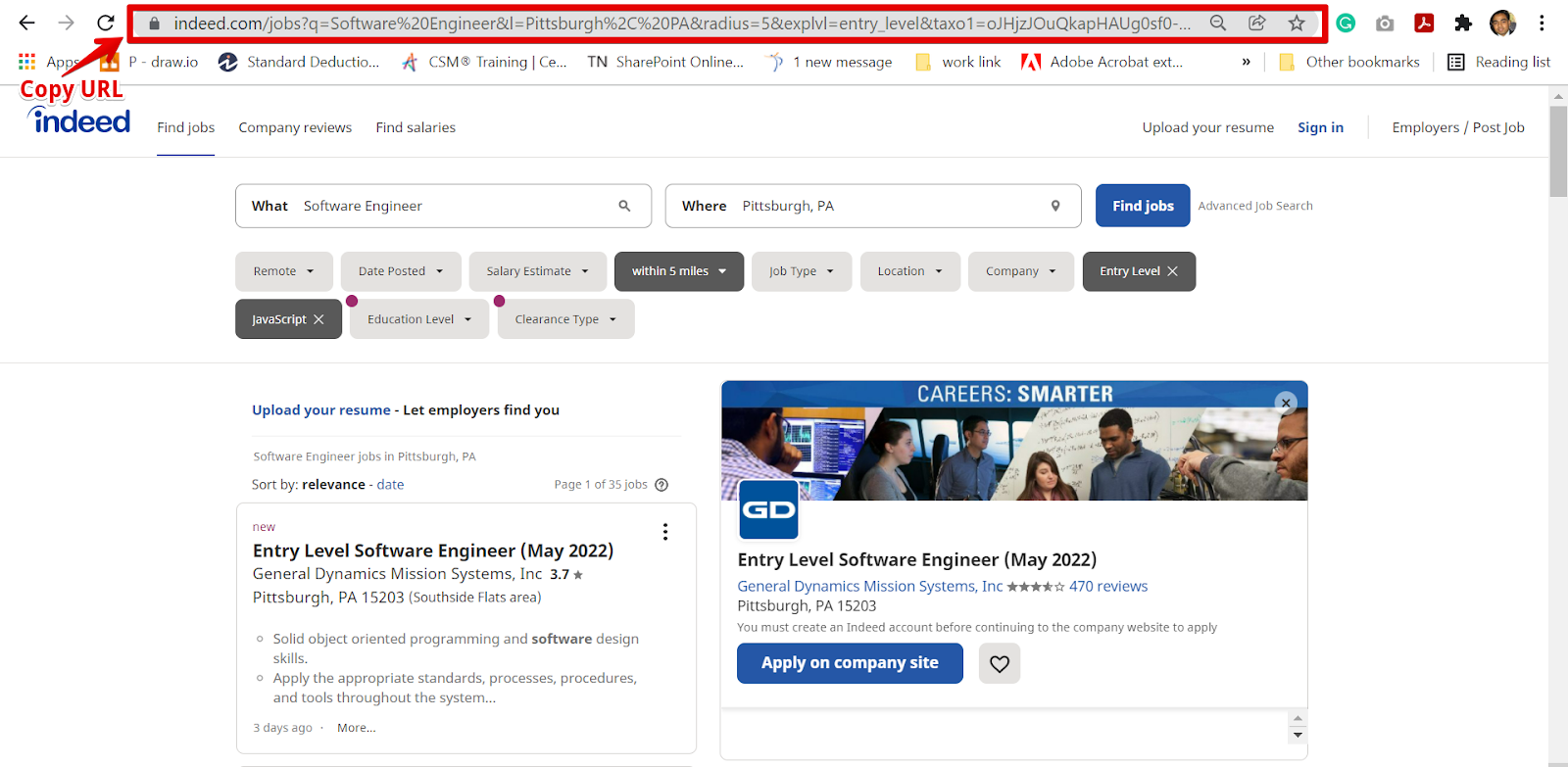
Go to the Indeed in a new tab, and then find the result by using the search feature. For example, let's search for Software Engineering, Pittsburgh, PA.
When your search is completed, copy the URL and go back into WebAutomation. Find the URL below that we used.
https://www.indeed.com/jobs?q=Software+Engineer&l=Pittsburgh,+PA&radius=5&explvl=entry_level&taxo1=oJHjzJOuQkapHAUg0sf0-Q
P.S
The only valid format for URLs contains /jobs?, /cmp/ and starts with https://www.indeed.com/
Note: To get the best result, make sure you use the more specific keyword in the Indeed search so that you will get the exact result and do not waste credits on unwanted results.
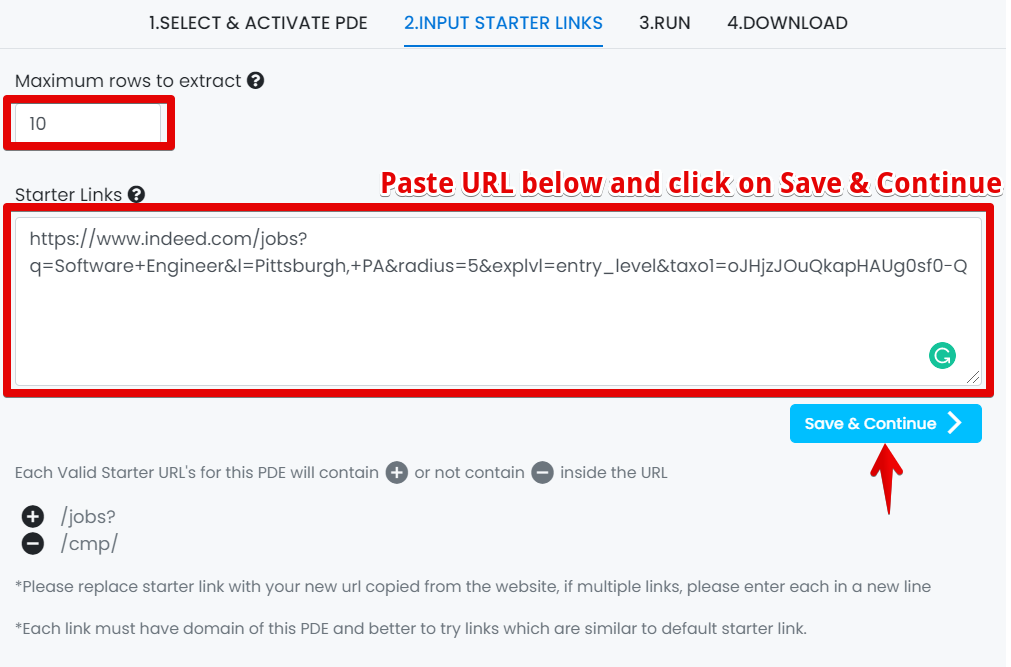
Users should have the ability to enter ‘Maximum rows’ to extract.
Users should have the ability to enter the ‘Starter Links’ and then click on ‘Save & Continue’.
Note: All valid Starter URLs must contain /jobs?, and /cmp/ as shown above.
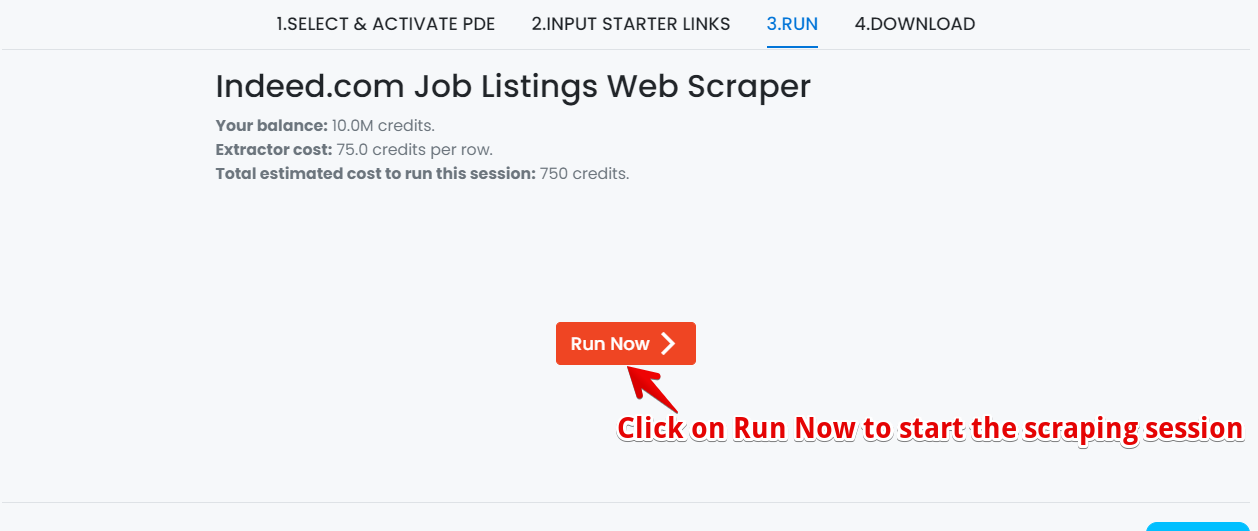
Users should have the ability to click on the "Run now " button to start the extractor session as shown below.
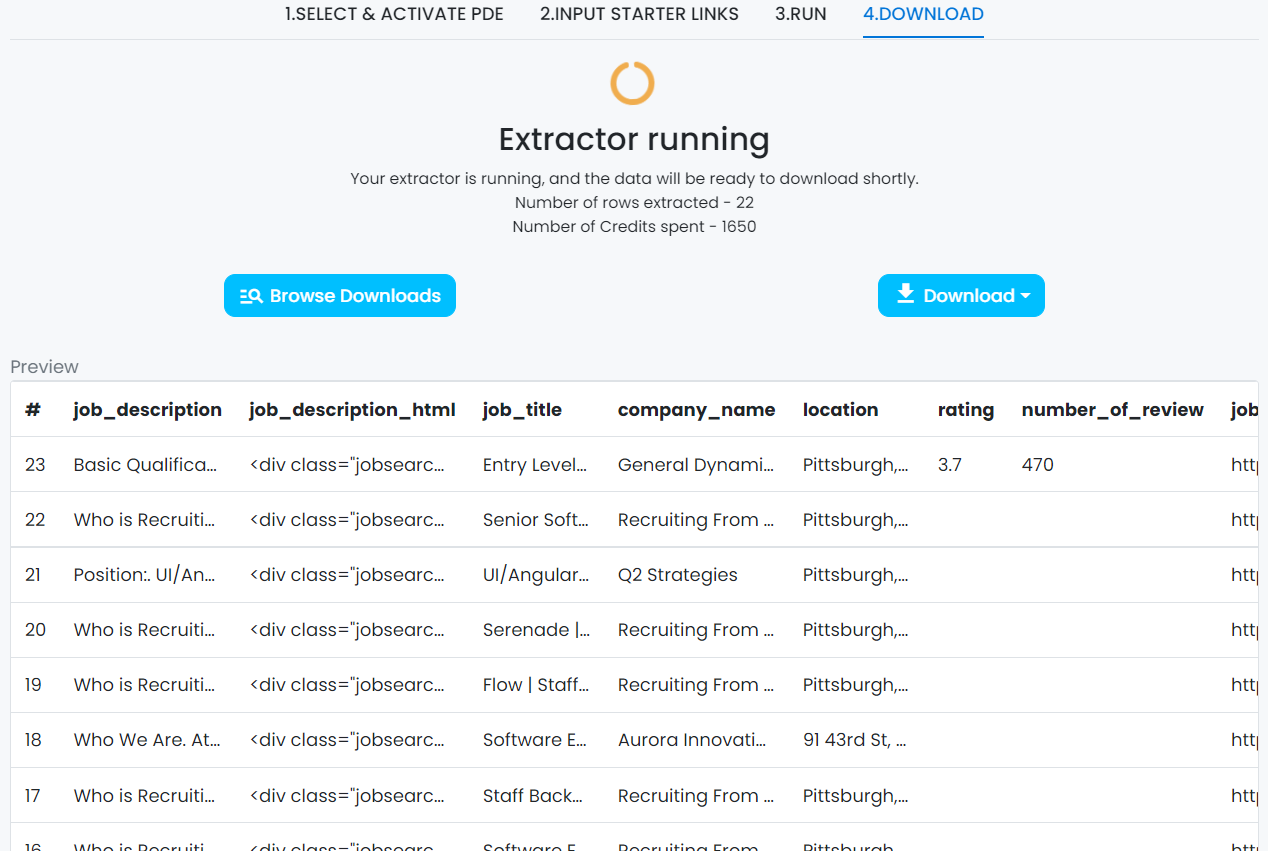
Depending on the no. of rows needed to be extracted it will take some time even in some cases hours to scrape all the results. The extractor will show the status as running while collecting all the data. Data preview of 23 rows are shown below.
There are two ways to download the data.
Users should be notified by email once the extractor is finished. Users can click on the given link and redirect to their account and go to the Data tab to download the data.
Users can directly login in the webautomation tool and go to the Data tab to download the data.
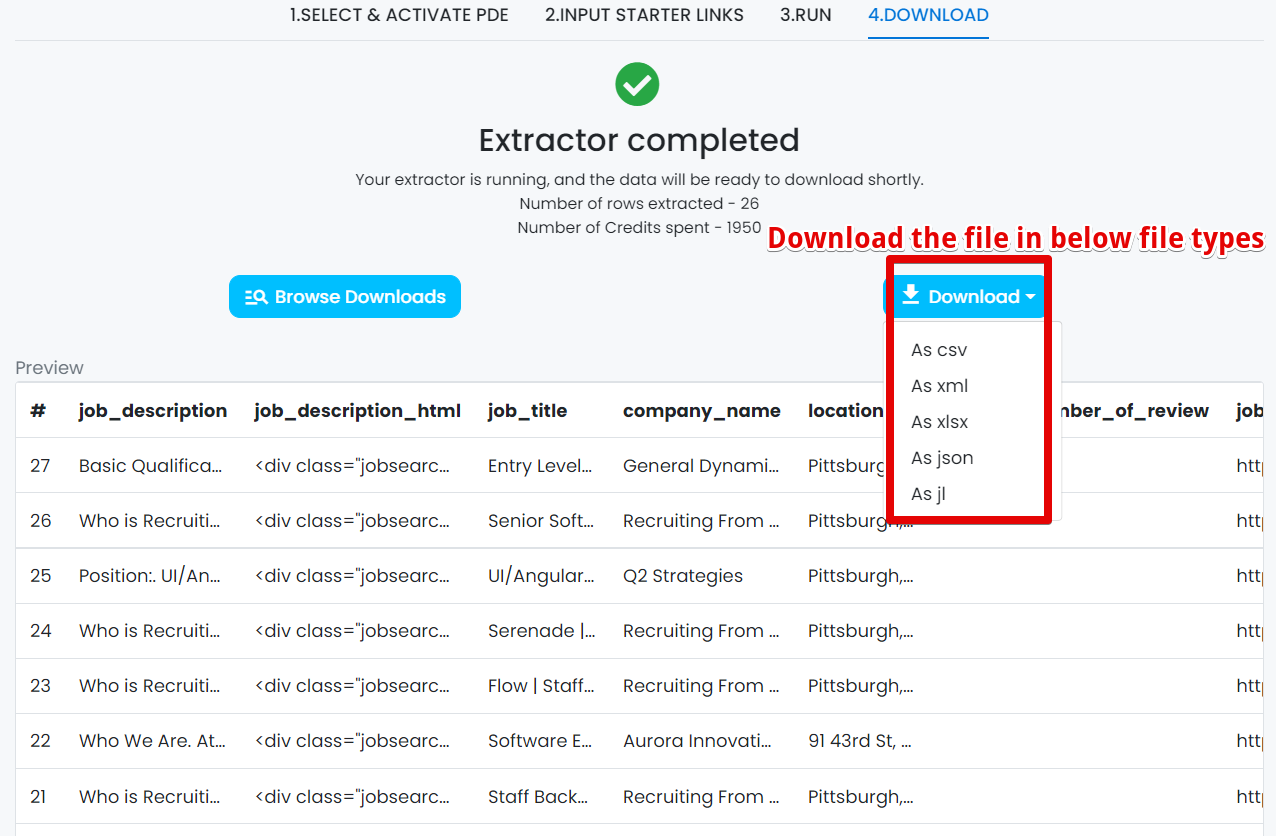
Users should have the ability to download the data as CSV, JSON, XLSX, XML, and JL as shown below.
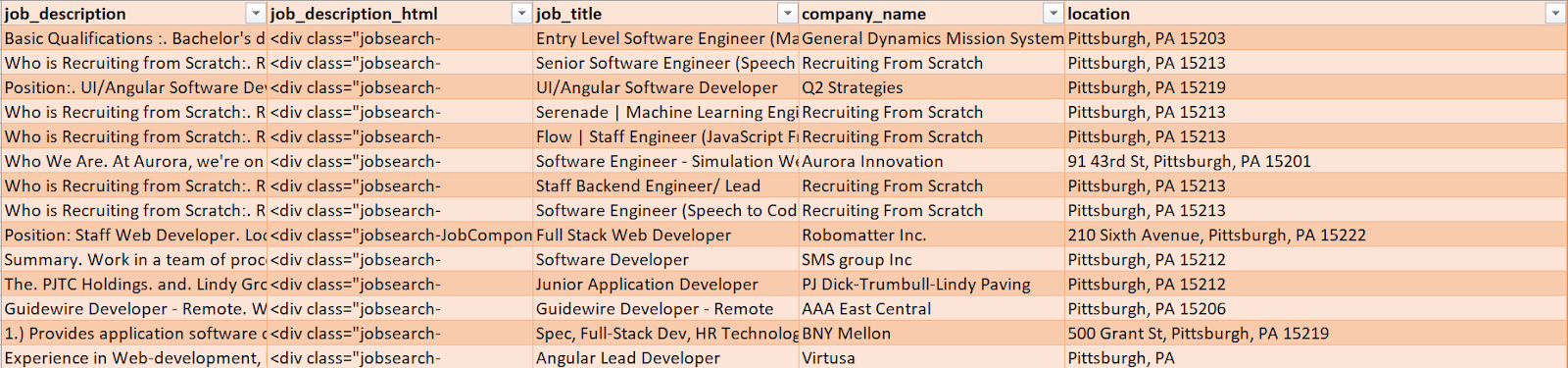
In this example, I am showing you a CSV file to download the report, so we will use Microsoft Excel to open the file.
Benefits of scraping Indeed.com?
Here are a lot of benefits for using web scraping in the job market.
Be up to date with everything
With the help of web scraping, you can always be updated and have relevant information about the changes in the job market. This will allow you to predict the changing market trends in the job market and restructure your approach to ensure success.
Be it an HR agency or an online job board company, having the latest job posts is essential for your success and efficiency.
Consistent and organised
Conducting regular job scraping endeavours will keep your data up to date and organised. This will hugely benefit your recruitment process and you will always have an updated bank of potential employees to approach for the relevant opening.
Relevant data
We are living in an age, where every sector is highly competitive and leveraging technology to boost its business. For HR agencies, scraping job board is a crucial first step towards success. Regularly scraping will keep you updated with the latest opening, criteria, requirement, salary ranges and much more. This information will boost the efficiency of your work immensely and help grow your business.
Scraping Indeed is a great start to a data-driven strategy to grow your business. Our Indeed web scraper makes it easier than ever. With just a click of a button, you will have a plethora of data to work with.
And the best part? Our web scraper requires no coding. With WebAutomation, web scraping is just that easy.
Sign up for a free trial for our Indeed web scraper and start growing your business today.


 Linkedin