What we do
Any public website, any scale
Give us a target site and requirements. We extract, clean, and deliver structured data on a schedule you define — no infrastructure needed on your side
We handle the hard parts
Anti-bot bypass, CAPTCHA solving, browser fingerprinting, JavaScript rendering, proxy rotation, and schema design — all managed by our team
Delivered to your pipeline
Real-time API, scheduled files, or webhooks. Data lands in S3, GCS, SFTP, or your destination of choice — on the cadence you need
Dedicated account manager
A named person on every project. They handle onboarding, monitor delivery, and respond to issues the same day
How it works
1
Tell us your requirements
Target sites, data fields, delivery format, and refresh frequency. A 20-minute call is usually enough to scope.
2
We build and test
Our team builds the extractors, validates against your schema, and delivers a sample for your approval before going live.
3
Data arrives on schedule
Continuous delivery with monitoring. Your dedicated account manager handles any site changes or issues.
B2B & Sales
AI SDR Platforms
People and company data for automated prospecting, personalisation, and AI-driven outreach sequences
Sales Intelligence
LinkedIn profiles and company data as a full enrichment layer for account intelligence and CRM tools
AI Recruiting Platforms
Candidate profile data for sourcing engines, skills-based matching, and AI-powered recruiting tools
AI & Model Training
Training data, RAG pipelines, and agent enrichment. Schema-consistent records ready for ingestion
Creator & Influencer
Influencer Marketing Platforms
Creator discovery, audience analytics, and campaign management tools built on YouTube, TikTok, and Instagram data
Creator Discovery Tools
Search and filter 200M+ YouTube channels and 100M+ TikTok profiles by niche, follower tier, engagement, and location
Creator Intelligence
Engagement benchmarks, subscriber growth trends, SEO scores, and contact emails across all major platforms
Travel Intelligence
Rate Parity Monitoring
Track hotel and airline pricing across OTA and direct channels. Detect parity breaches in real time
Competitive Rate Intelligence
Monitor competitor pricing across target routes and properties. Feed directly into revenue management systems
OTA Aggregation
Normalised pricing and availability data across 19+ OTAs and brand sites. One schema, all sources
Reviews Intelligence
Competitive Intelligence
Monitor competitor ratings, review trends, and sentiment shifts across G2, Glassdoor, and Capterra
Voice of Customer
Structured review data for NLP, sentiment modelling, and product intelligence at scale
Employer Intelligence
Track employer sentiment, interview experience, and culture signals across Glassdoor and Clutch
WebAutomation
Pricing
Get started free

How to Scrape eBay without Writing Any Code

By Victor @July, 20 2021

how to scrape ebay without writing any code

Introduction

In this how-to guide, we’re going to show you how to use  WebAutomation's ready-made eBay Price Data Scraper to extract data from eBay.  With this tool, you will be able to extract data like product information, prices, and images, etc. from eBay category pages quickly and easily, without having to write any code.

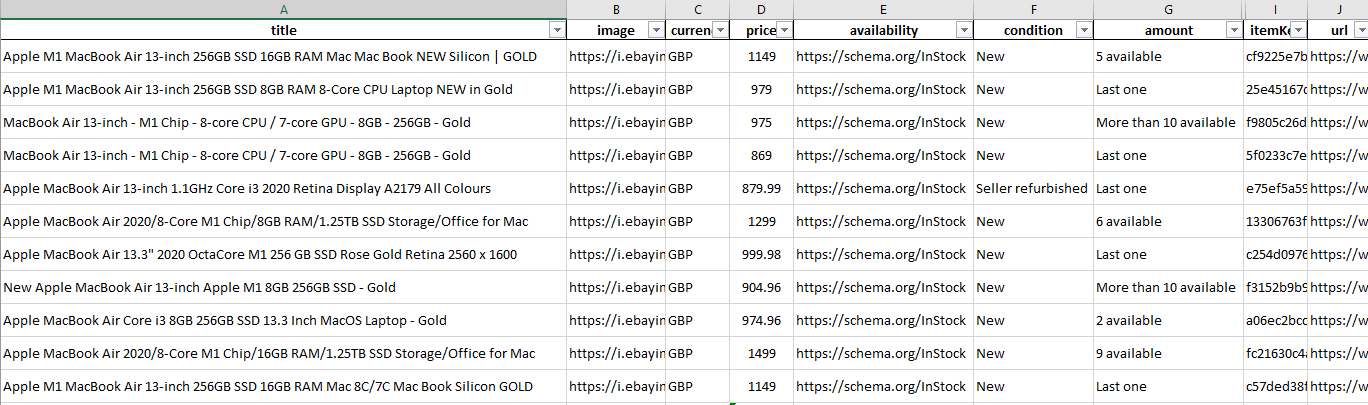
See the data highlighted in the screenshot of the information from eBay you will be able to extract.


Step 1:

Sign up / Sign in. If you don't already have a Webautomation account, you can sign up for Free 14-Day Trial here


Step 2: Find the eBay Pre-Defined Extractor

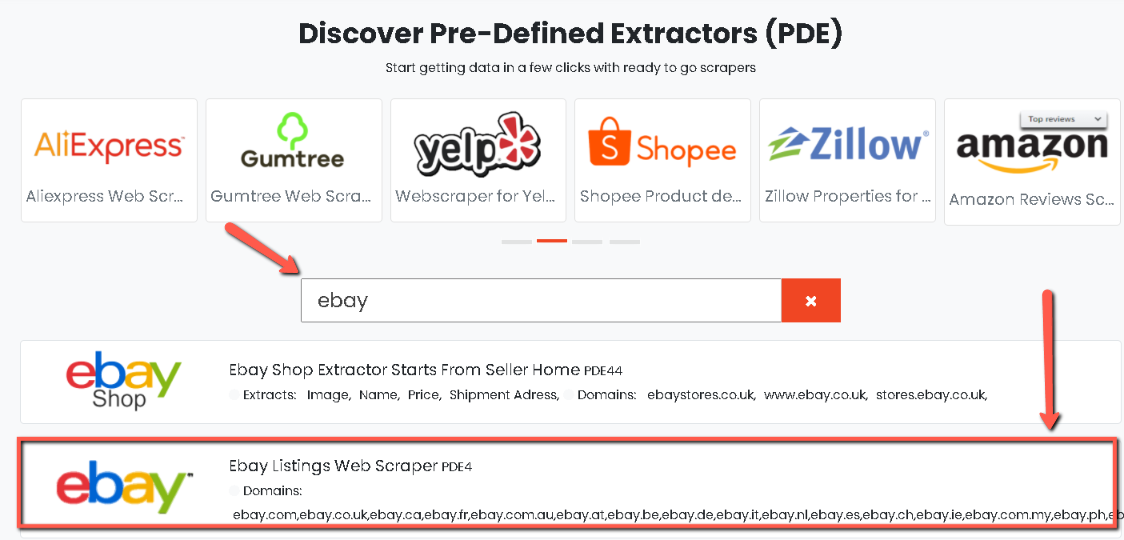
Once you sign in, you will be redirected to the in-app home page. As we are looking for the eBay scraper, use the search term "ebay" on the main search bar. Select the "eBay Listings Web Scraper PDE4".


Step 3: Activate

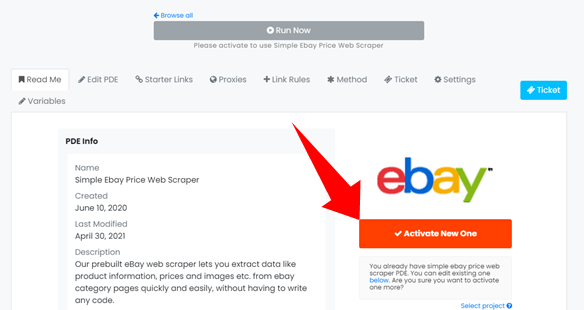
To confirm you want to go ahead and add the extractor to your profile, click the Activate button


Step 4: Get URLs from eBay

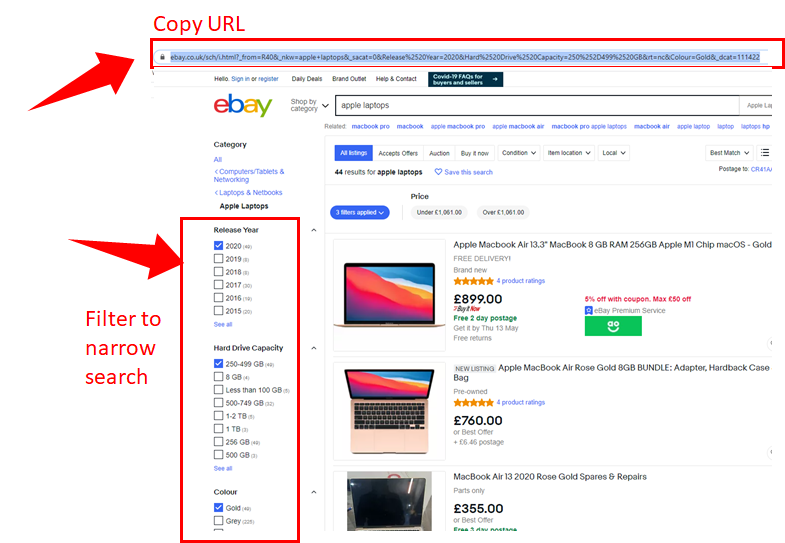
Let's open eBay in a new tab and find the data we are looking for. For this example, we are trying to monitor all the Apple laptops for sale, so let's search for  “apple laptops” in the eBay search bar. To be more precise we can use some search filters on the left navigation to narrow our search (see screenshot below) 


Once you have searched, copy the URL and go back into WebAutomation.

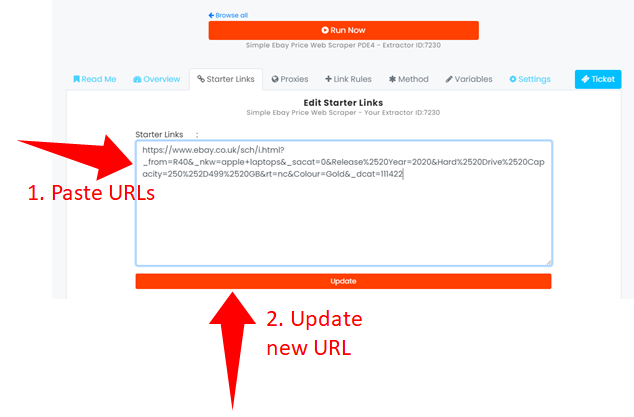
See URL we used https://www.ebay.co.uk/sch/i.html?_from=R40&_nkw=apple+laptops&_sacat=0&Release%2520Year=2020&Hard%2520Drive%2520Capacity=250%252D499%2520GB&rt=nc&Colour=Gold&_dcat=1114


Pro tip 1:  To get the best results, make your ebay search is as specific as possible so you limit your results and not waste any credits on unwanted results


Step 5: Configure the extractor

The key input required is the starter links from eBay. In this use case, the starter links are the search URLs we copied from eBay.


Pro tip 2: To increase the speed of the extractor, go to "settings and increase the concurrent Request count" please note this is only available on specific plans


Step 6: Run the Extractor

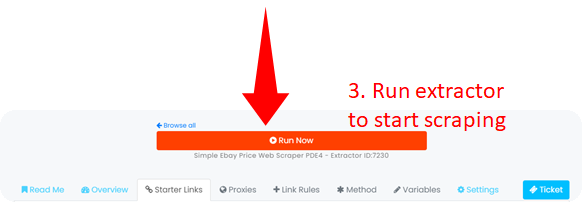
 Click the big "Run now " button to begin the extractor session


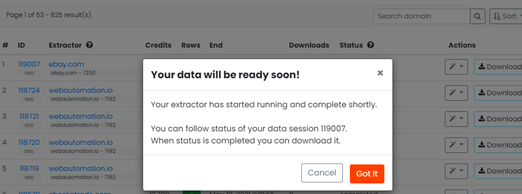
You will get a pop up telling you the extractor is running and the status of the extractor will show as "running"


Step 7: Download your data

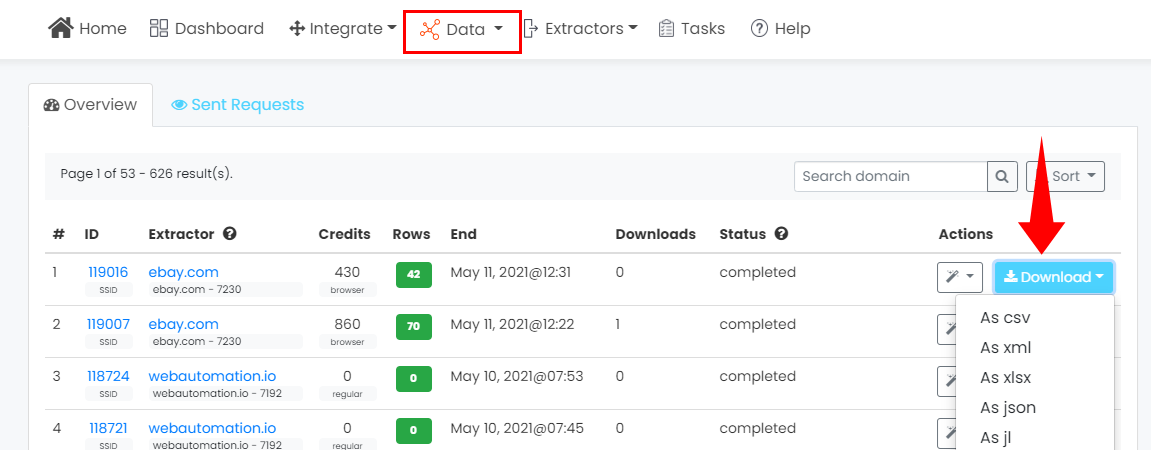
Once the status of the extractor says "completed" you are now ready to download the data. You will also get an email letting you know that the data is ready. You have options to download as CSV, JSON, XLS, SML and JL¿


Step 8: Open the data file

For this  example, we downloaded our file as a CSV so we will use Microsoft Excel to open the file.


Typical use cases for ebay data

  • As an eCommerce merchant wanting to list their products on eBay. Scraping can be a quick way to get product descriptions, images, etc 

  • As an eBay seller, the best way to monitor competitor prices is to scrape all the sellers selling similar products

  • As a brand, if you wanted to monitor people reselling your products, scraping would be an efficient way to check for MAP compliance or even for those selling your products without the proper authority


Conclusion

To be competitive in selling on eBay scraping isn't an option but a necessity. Understanding your competitors' strategies, pricing and promotion is intelligence that will set you apart.

Getting this data should be easy right? Yes this is why we created our pre-defined eBay web-scraper to help you get eBay data in minutes without having to write code.

WEBAUTOMATION.IO PRE-DEFINED EXTRACTORS

We aim to make the process of extracting web data quick and efficient so you can focus your resources on what's truly important, using the data to achieve your business goals. In our marketplace, you can choose from hundreds of pre-defined extractors (PDEs) for the world's biggest websites. These pre-built data extractors turn almost any website into a spreadsheet or API with just a few clicks. The best part? We build and maintain them for you so the data is always in a structured form.  .

Let us assist you with your web extraction needs. Get started for FREE

* indicates required
someone@example.com

Are you ready to start getting your data?

Your data is waiting….