What we do
Any public website, any scale
Give us a target site and requirements. We extract, clean, and deliver structured data on a schedule you define — no infrastructure needed on your side
We handle the hard parts
Anti-bot bypass, CAPTCHA solving, browser fingerprinting, JavaScript rendering, proxy rotation, and schema design — all managed by our team
Delivered to your pipeline
Real-time API, scheduled files, or webhooks. Data lands in S3, GCS, SFTP, or your destination of choice — on the cadence you need
Dedicated account manager
A named person on every project. They handle onboarding, monitor delivery, and respond to issues the same day
How it works
1
Tell us your requirements
Target sites, data fields, delivery format, and refresh frequency. A 20-minute call is usually enough to scope.
2
We build and test
Our team builds the extractors, validates against your schema, and delivers a sample for your approval before going live.
3
Data arrives on schedule
Continuous delivery with monitoring. Your dedicated account manager handles any site changes or issues.
B2B & Sales
AI SDR Platforms
People and company data for automated prospecting, personalisation, and AI-driven outreach sequences
Sales Intelligence
LinkedIn profiles and company data as a full enrichment layer for account intelligence and CRM tools
AI Recruiting Platforms
Candidate profile data for sourcing engines, skills-based matching, and AI-powered recruiting tools
AI & Model Training
Training data, RAG pipelines, and agent enrichment. Schema-consistent records ready for ingestion
Creator & Influencer
Influencer Marketing Platforms
Creator discovery, audience analytics, and campaign management tools built on YouTube, TikTok, and Instagram data
Creator Discovery Tools
Search and filter 200M+ YouTube channels and 100M+ TikTok profiles by niche, follower tier, engagement, and location
Creator Intelligence
Engagement benchmarks, subscriber growth trends, SEO scores, and contact emails across all major platforms
Travel Intelligence
Rate Parity Monitoring
Track hotel and airline pricing across OTA and direct channels. Detect parity breaches in real time
Competitive Rate Intelligence
Monitor competitor pricing across target routes and properties. Feed directly into revenue management systems
OTA Aggregation
Normalised pricing and availability data across 19+ OTAs and brand sites. One schema, all sources
Reviews Intelligence
Competitive Intelligence
Monitor competitor ratings, review trends, and sentiment shifts across G2, Glassdoor, and Capterra
Voice of Customer
Structured review data for NLP, sentiment modelling, and product intelligence at scale
Employer Intelligence
Track employer sentiment, interview experience, and culture signals across Glassdoor and Clutch
WebAutomation
Pricing
Get started free

How To Scrape Costco For Shopify Dropshipping

By Admin @March, 30 2022

how to scrape costco for shopify dropshipping

How To Scrape Costco For Shopify Dropshipping


Online e-commerce has revolutionised the way products are sold. Although online shopping has many advantages for consumers, retailers face many challenges i.e

  • The retailer has to buy and stock products physically in advance
  • The retailer needs to arrange for the products delivered to the customer
  • The retailer needs to factor in and be responsible for all the logistics, packaging and fulfilment

A solution to this challenge is Dropshipping!

Dropshipping is a new way to sell online where the retailer focuses on the marketing and sales of the product. All the backend packaging, stocking and fulfilment is managed by a thirdparty.


Video Tutorial


In this article we will show you have to scrape products from Costco one of the most popular wholesaler to a shopify ecommerce store

Pre-requisites

  • A shopify store

  • A webautomation.io account

  • A csv file reader e.g microsoft excel

___________________________________________


Scraping is becoming increasingly popular as people all over the world are now using these automated scraping tools to gather data, analyse it, and improve products/ services accordingly.


How To Use Webautomation.io Costco Scrapers- Detailed Steps

Step 1: Sign up /Sign in

If you don’t have an account on webautomation, please use the signup link for a free trial. New users can use the email address to create an account.

Step 2: Find the right Costco from the marketplace

Users need to begin with accessing a suitable Costco domain according to their location. For instance, users in the U.S. can choose www.costco.com or if in Canda use www.costco.ca.
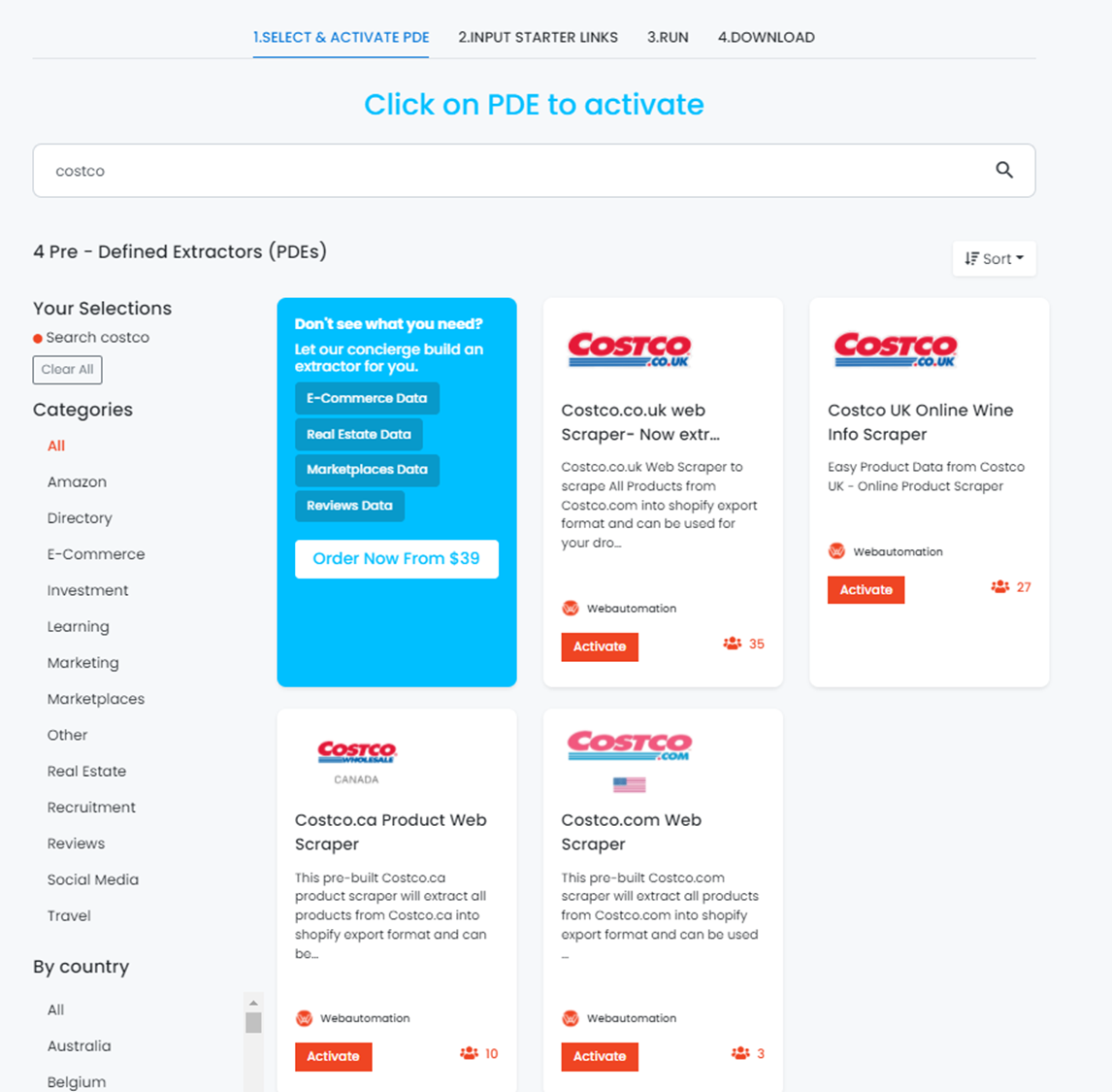
 However, users in the UK need to access a different domain which is www.costco.co.uk.


 It is important that users enter the right domains because the local warehouse product availability and prices differ for each of these locations. So, a product available at the U.S. outlet may not necessarily be available in the UK.

2.  Start Adding URLS

Once you find a suitable Costco domain, proceed to add the category URLs into the web scraper. By default the sitemap URL will be there and this will scrape the entire catalogue of products. If you wanted to scrape only a category e.g https://www.costco.ca/office-products.html please insert this url
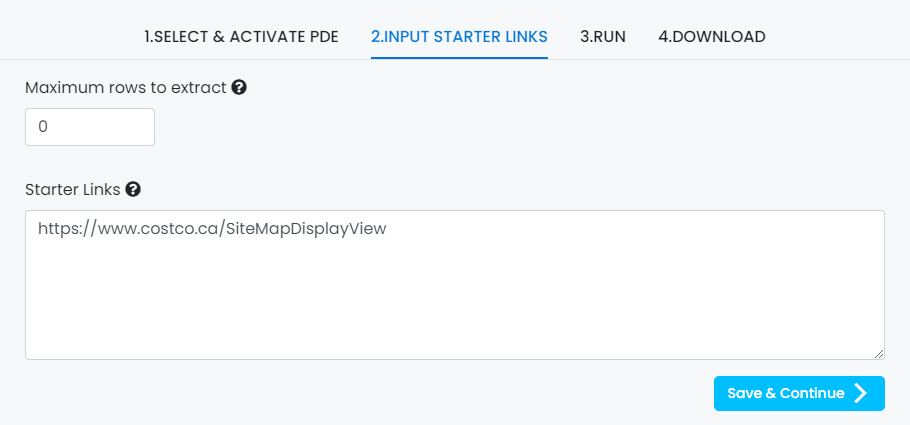
3.  Run Scraper

Users need to run the scraper once they have added the relevant URLs.The scrapers will continue to collect data from the website, categorise them and make them available for storage. The scraping process depends on the kind of scraper you choose.


 For instance, a reputable data scraper like Webautomation.io, offers the best possible options for users. We will talk about these options ahead.

4.  Export Data

Once the scraping process completes, users can export data for further analysis and use. This is where Web Automation.io’s spreadsheet conversion option comes in handy. It allows users to gather all the data, and turn it into a spreadsheet for better analysis and usage.

You can export the data through any of the supported formats like CSV, XSLX, JSON


How To Import Data Into My Shopify Store?

step 1: login to your shopify acount

Importing data into your Shopify store is not difficult with the right steps. Users need to follow the following method.
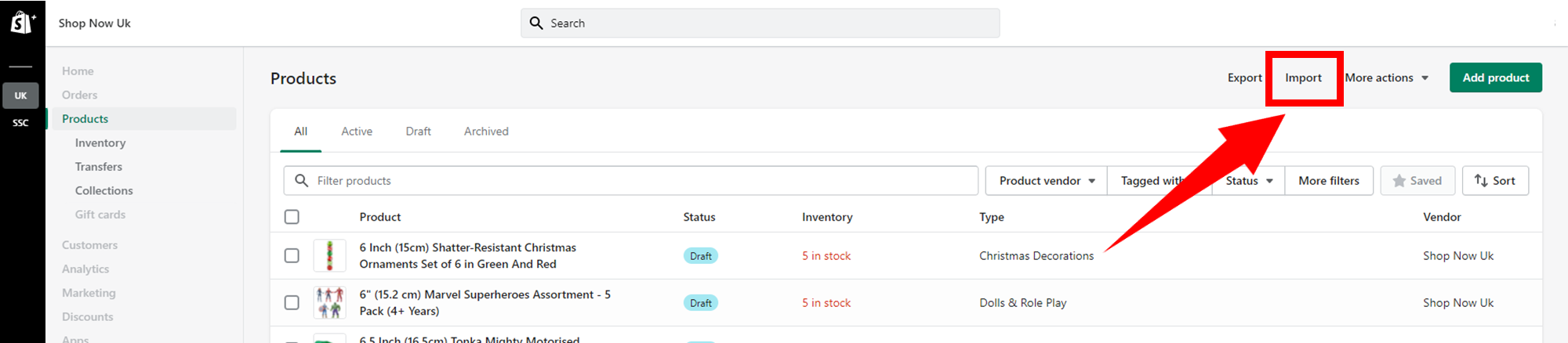
 

  • Access your Shopify Admin section, and go to Products.
  • Next, click Import.

  • Click on Add file, and choose a CSV file that you want to import. (Users who want to overwrite values for existing handles can access the Overwrite option to change any current products with a similar handle. However, the existing values will be a part of missing values.
  • Click Upload and continue.
  • Recheck the details about imports, and click on import.


For more information, we suggest you check out the Shopify Manual.

WEBAUTOMATION.IO PRE-DEFINED EXTRACTORS

We aim to make the process of extracting web data quick and efficient so you can focus your resources on what's truly important, using the data to achieve your business goals. In our marketplace, you can choose from hundreds of pre-defined extractors (PDEs) for the world's biggest websites. These pre-built data extractors turn almost any website into a spreadsheet or API with just a few clicks. The best part? We build and maintain them for you so the data is always in a structured form.  .

FAQs


How can I scrape all products from Costco?

Users need to use a Shopify compatible web scraper like web automation.io.

How can I import costco export into shopify import format?

Users can refer to our step-by-step guide mentioned in this article (insert link) to import Costco expert into shopify import format

Let us assist you with your web extraction needs. Get started for FREE

* indicates required
someone@example.com

Are you ready to start getting your data?

Your data is waiting….