What we do
Any public website, any scale
Give us a target site and requirements. We extract, clean, and deliver structured data on a schedule you define — no infrastructure needed on your side
We handle the hard parts
Anti-bot bypass, CAPTCHA solving, browser fingerprinting, JavaScript rendering, proxy rotation, and schema design — all managed by our team
Delivered to your pipeline
Real-time API, scheduled files, or webhooks. Data lands in S3, GCS, SFTP, or your destination of choice — on the cadence you need
Dedicated account manager
A named person on every project. They handle onboarding, monitor delivery, and respond to issues the same day
How it works
1
Tell us your requirements
Target sites, data fields, delivery format, and refresh frequency. A 20-minute call is usually enough to scope.
2
We build and test
Our team builds the extractors, validates against your schema, and delivers a sample for your approval before going live.
3
Data arrives on schedule
Continuous delivery with monitoring. Your dedicated account manager handles any site changes or issues.
B2B & Sales
AI SDR Platforms
People and company data for automated prospecting, personalisation, and AI-driven outreach sequences
Sales Intelligence
LinkedIn profiles and company data as a full enrichment layer for account intelligence and CRM tools
AI Recruiting Platforms
Candidate profile data for sourcing engines, skills-based matching, and AI-powered recruiting tools
AI & Model Training
Training data, RAG pipelines, and agent enrichment. Schema-consistent records ready for ingestion
Creator & Influencer
Influencer Marketing Platforms
Creator discovery, audience analytics, and campaign management tools built on YouTube, TikTok, and Instagram data
Creator Discovery Tools
Search and filter 200M+ YouTube channels and 100M+ TikTok profiles by niche, follower tier, engagement, and location
Creator Intelligence
Engagement benchmarks, subscriber growth trends, SEO scores, and contact emails across all major platforms
Travel Intelligence
Rate Parity Monitoring
Track hotel and airline pricing across OTA and direct channels. Detect parity breaches in real time
Competitive Rate Intelligence
Monitor competitor pricing across target routes and properties. Feed directly into revenue management systems
OTA Aggregation
Normalised pricing and availability data across 19+ OTAs and brand sites. One schema, all sources
Reviews Intelligence
Competitive Intelligence
Monitor competitor ratings, review trends, and sentiment shifts across G2, Glassdoor, and Capterra
Voice of Customer
Structured review data for NLP, sentiment modelling, and product intelligence at scale
Employer Intelligence
Track employer sentiment, interview experience, and culture signals across Glassdoor and Clutch
WebAutomation
Pricing
Get started free

How to scrape coinmarketcap.com for historical cryptocurrency prices

By Admin @February, 4 2022

how to scrape coinmarketcap.com for historical cryptocurrency prices

How to Scrape Coinmarketcap historical data Scraper Step by Step:


In this article, we are going to explain how to use the webautomation.io automated Coinmarketcap scraper to extract historical crypto-currency data from Coinmarketcap. With the help of webautomation, you will be able to easily extract historic crypto currency prices data from coinmarketcap without writing any code in just a few steps


For this user guide, we are going to use Webautomation PDEs


Step 1: Sign up /Sign in

If you don’t have an account on webautomation, please use the signup link for a free trial. New users can use the email address to create an account.

Step 2: Find the Coinmarketcap Scraper

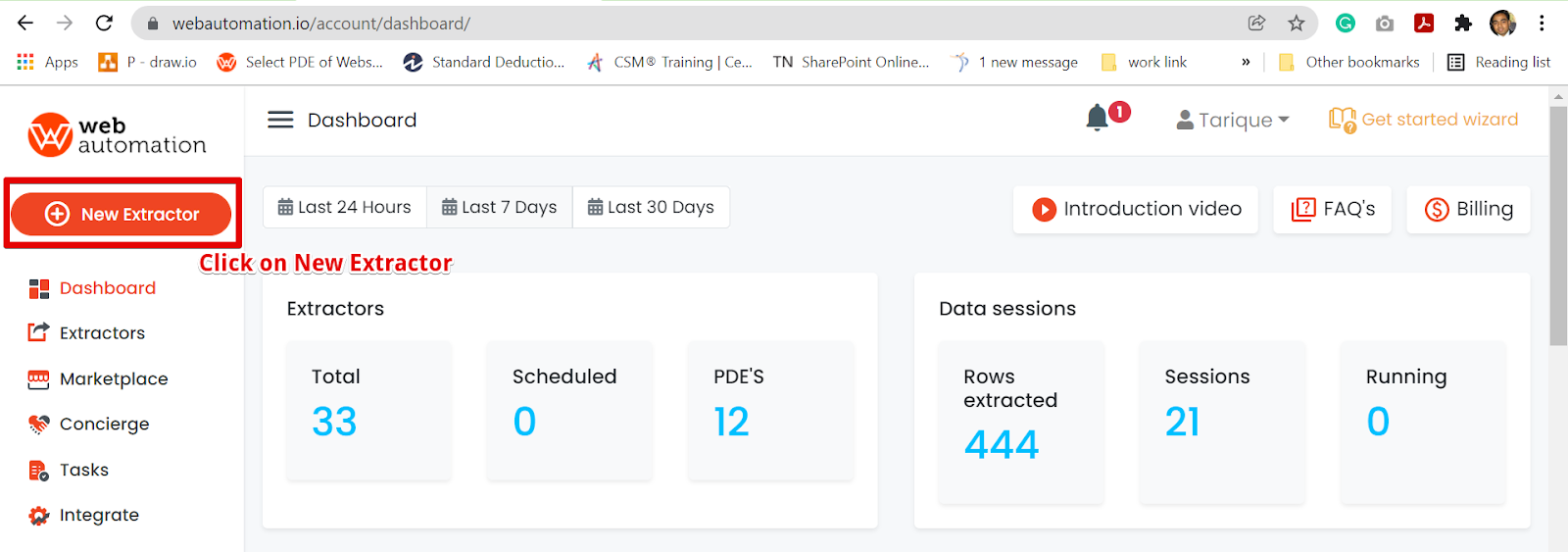
When you log in, you will be redirected to the ‘Dashboard’. Click on the ‘New Extractor’ on the left side as highlighted below.


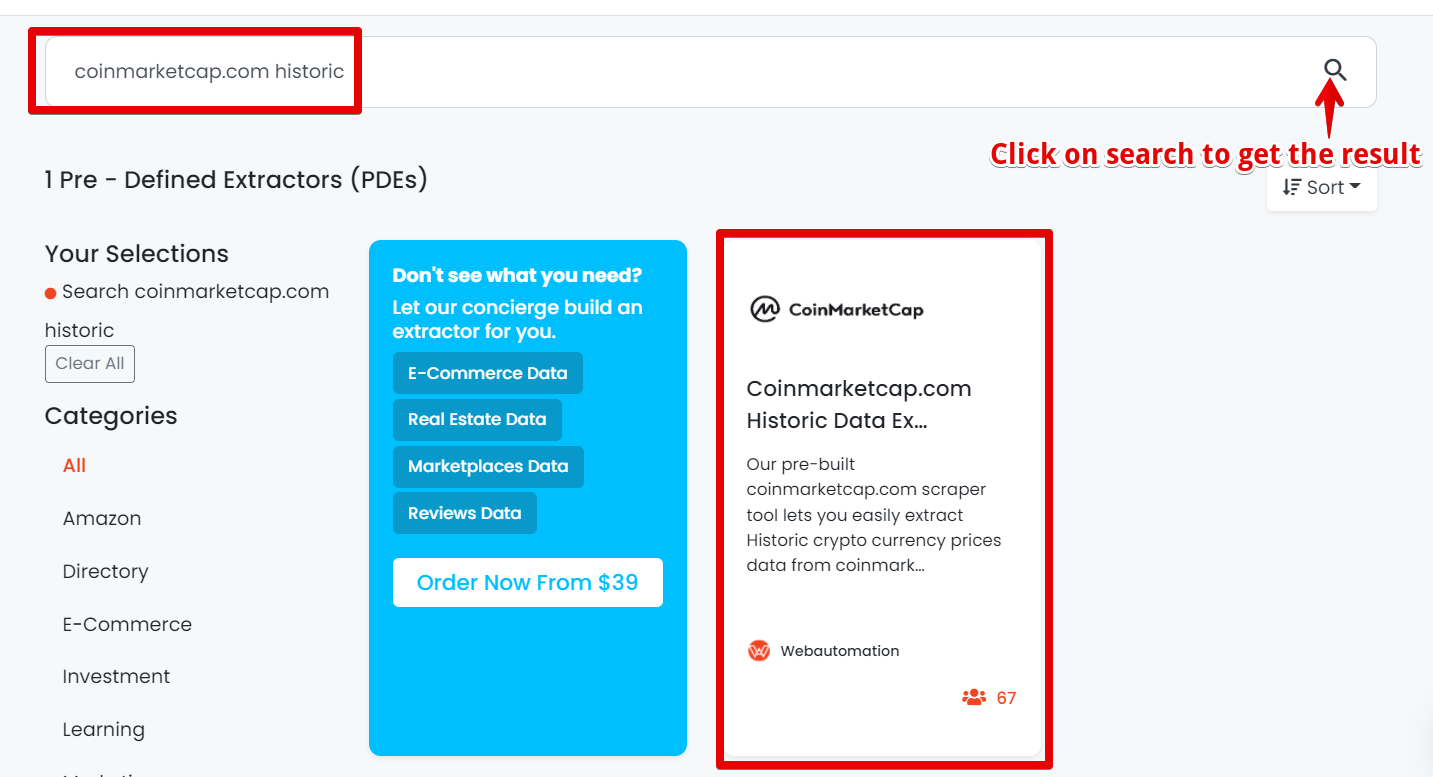
Go to the search bar and enter ‘Coinmarketcap’ and then click on the ‘search icon’ on the right side as shown below. After getting the search result click on it to activate.


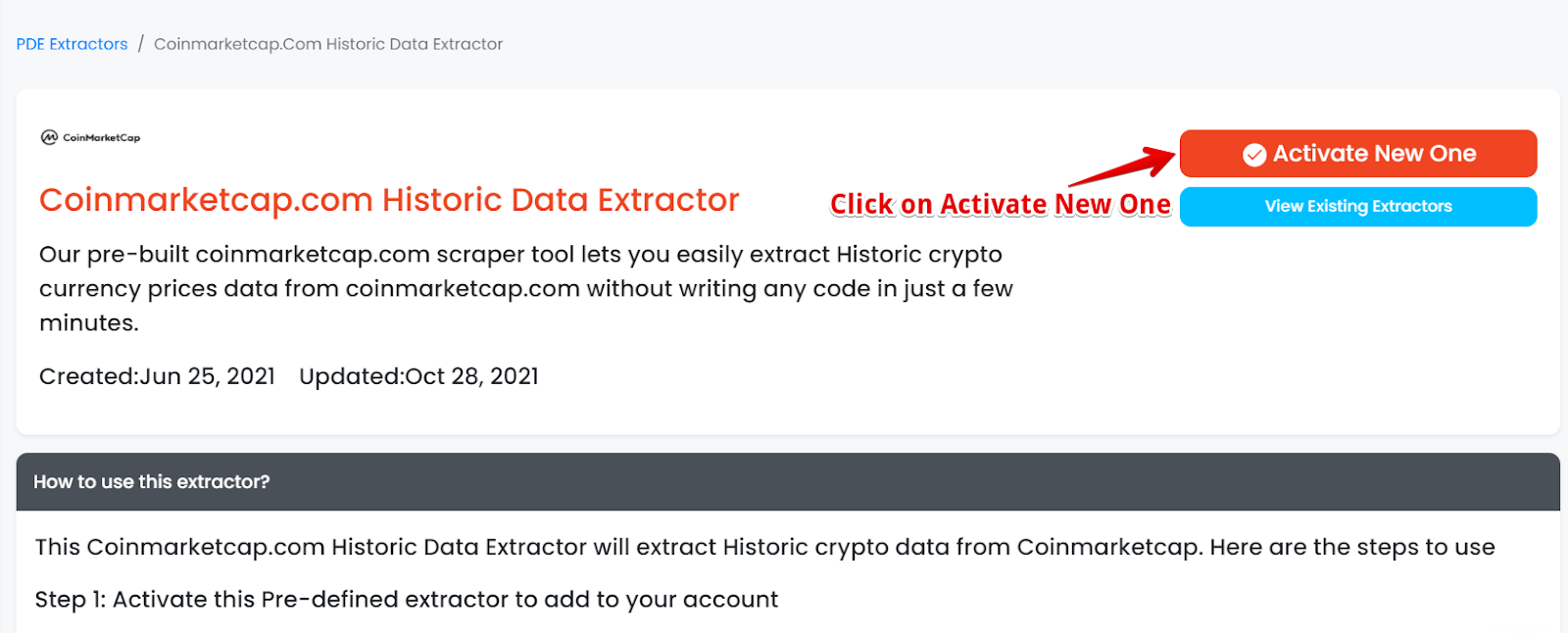
Click on ‘Activate New One’ as shown below.


Step 3: Find exact URLs from Coinmarketcap.com

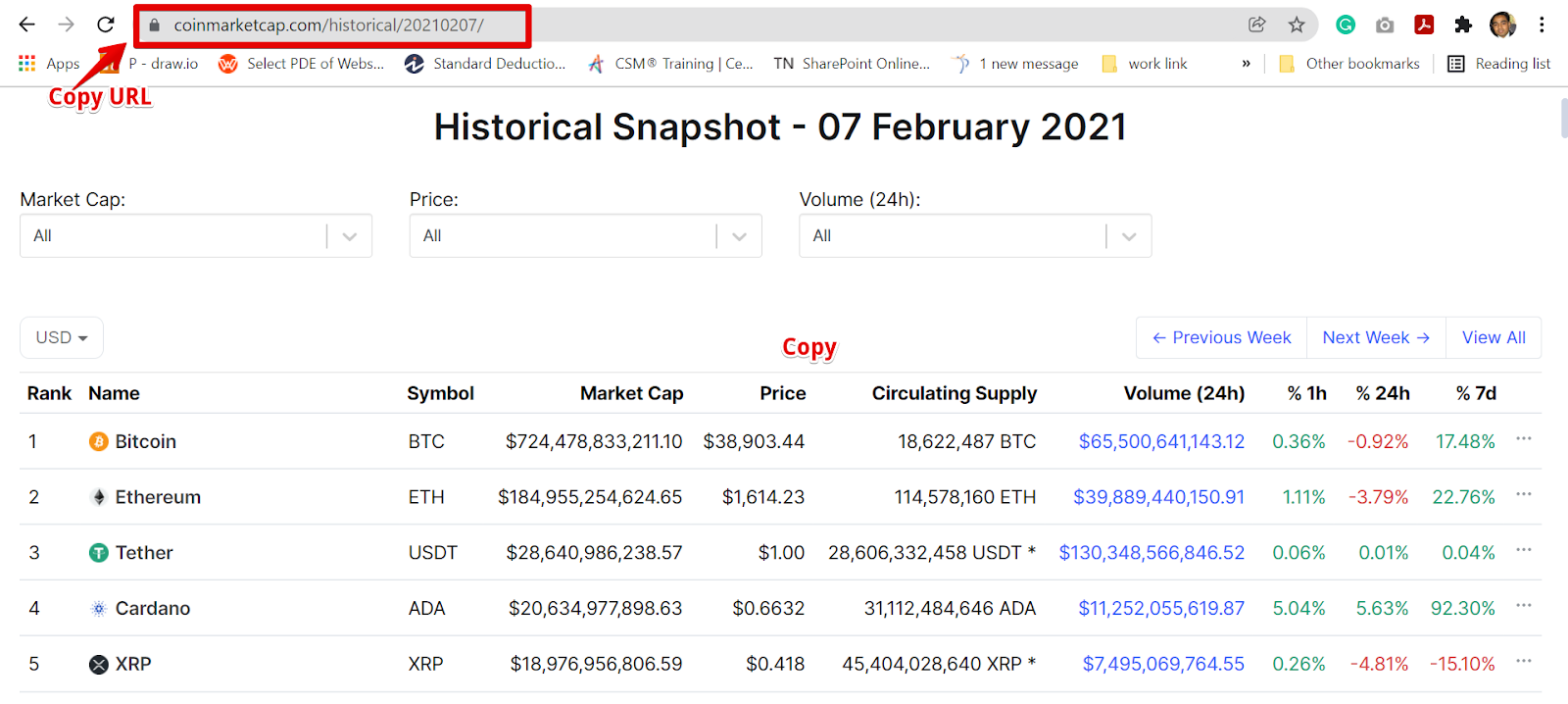
Go to Coinmarketcap in a new tab, and then find the result by using the search feature. For example, let's search for cryptocurrency historical data on 07 February 2021.

When your search is completed, copy the URL and go back into WebAutomation. Find the URL below that we used.

https://coinmarketcap.com/historical/20210207/

P.S 

The only valid format for URLs starts with https://coinmarketcap.com


Step 4: Add values and Run the Extractor

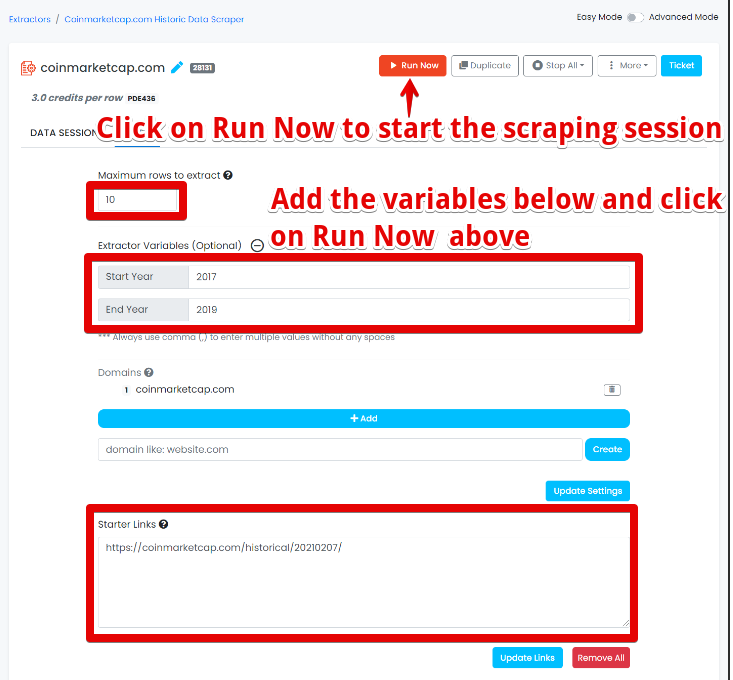
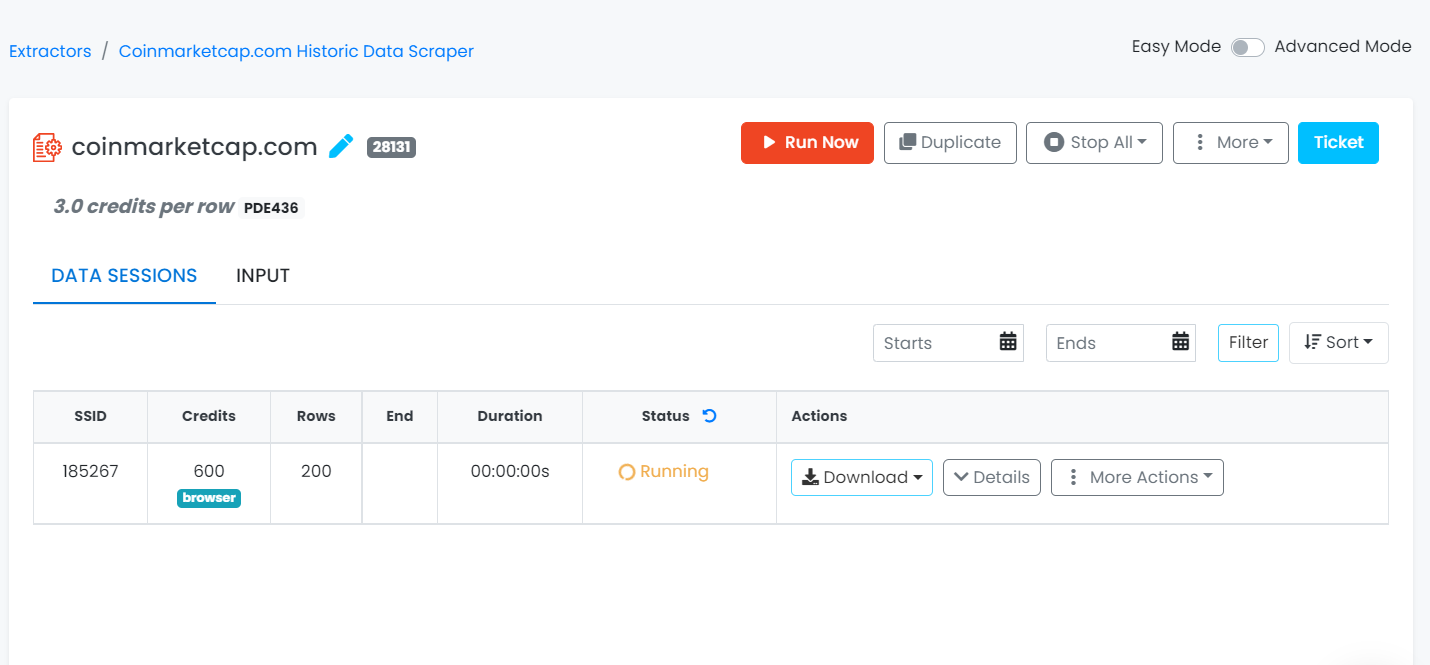
Click on ‘Run Now’  button to start the extractor session as shown below. 

Note: Extract variables below in the screenshot gives you more options on what the scraper should scrape.


Step 5: WebAutomation will get the data

Depending on the no. of rows needed to be extracted it will take some time even in some cases hours to scrape all the results. The extractor will show the status as running while collecting all the data. Data preview of 200 rows are shown below.


Step 6: Download the data

There are two ways to download the data.

 
  1. Users should be notified by email once the extractor is finished. Users can click on the given link and redirect to their account and go to the Data tab to download the data.

  2. Users can directly login in webautomation tool and go to the Data sessions tab to download the data.

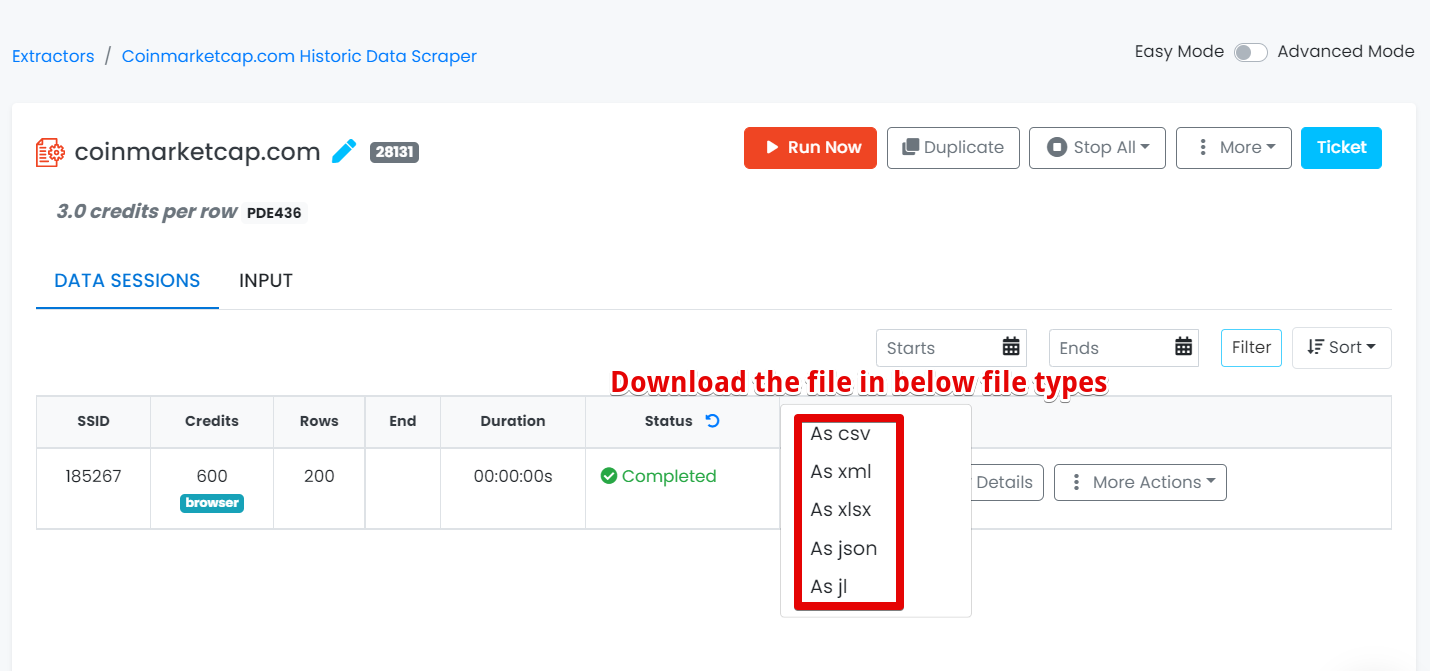
Users should have the ability to download the data as CSV, JSON, XLSX, XML, and JL as shown below.


  Step 7: Open the Data File

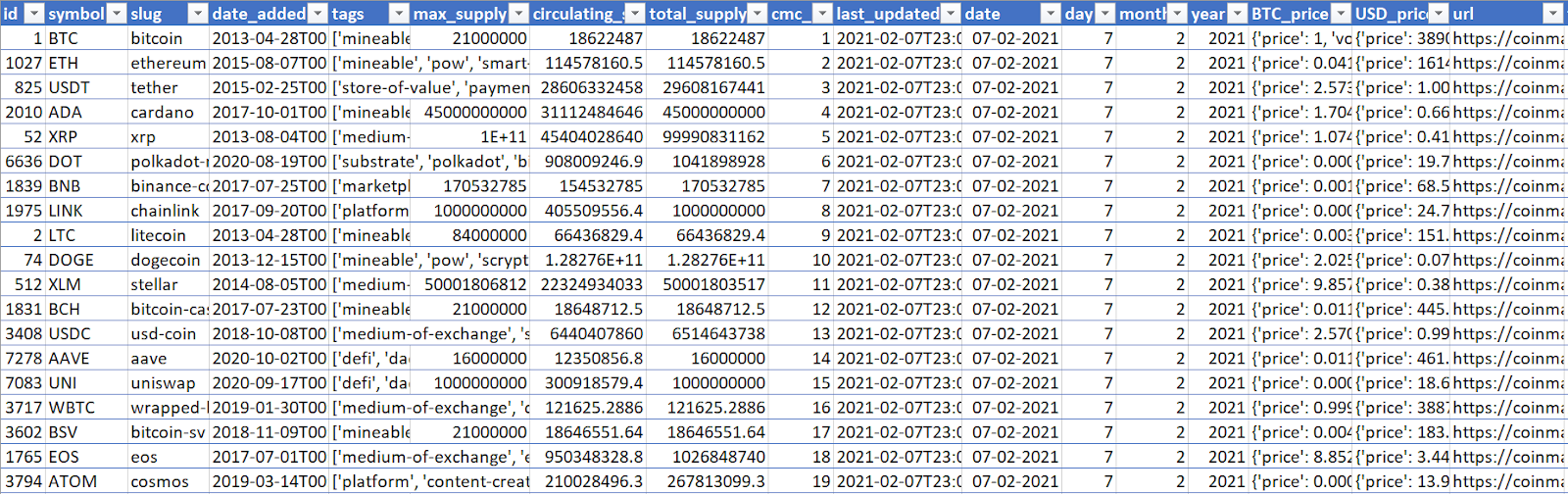
In this example, I am showing you a CSV file to download the report, so we will use Microsoft Excel to open the file. 


Let us assist you with your web extraction needs. Get started for FREE

* indicates required
someone@example.com

Are you ready to start getting your data?

Your data is waiting….